
2Screens Presenter for iPhone1.12.3 - App Store
You'll be able to see results in few seconds.
Publisher Description
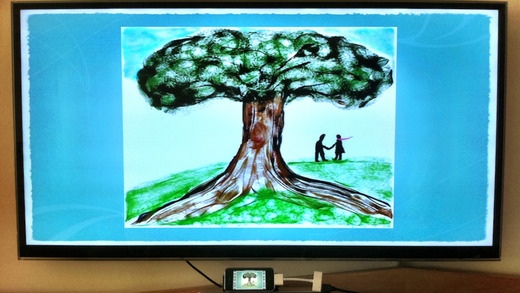
Since its launch in mid 2010, '2Screens - Presentation Expert' has always been one of the best-selling iPad apps specialized for conducting presentations. Now, an iPhone version is available!
With a full-featured document manager, file viewer, web browser and whiteboard with VGA-out* and HDMI-out** to TV, LCD monitor or projector, 2Screens for iPhone is your perfect tool for showing your presentation materials, no matter they are stored on your iPhone, on the Internet or a private web site.
With multi-tab support, you can switch among screens with web contents, PDF/PowerPoint slides, spreadsheets or photos/image files, all within this app easily during a presentation.
The app supports to use the iPhone app '2Screens Remote (sold separately) as a Bluetooth remote control for switching among pages/tabs and moving the laser pointer .
You can annotate on a whiteboard/chalkboard tab, or use the current slide as a background image. Screenshots of the annotations can be saved for future use.
Please note that the app requires to be run on iPhone 4 or the 4th generation of iPod Touch (or newer models) in order to make use of the TV-out function.
*VGA-out requires an Apple VGA adapter. Component or Composite AV cables are also supported at lower resolution.
**HDMI-out requires an Apple Digital AV adapter
FEATURES:
BASIC
Document manager, file viewer, web browser, A/V player, text file editor
Whiteboard
Fast PDF display engine
Auto-detect and output to connected external screens
TV-out to projector or LCD/HDTV through Apple VGA or Digital AV adapters
AirPlay support - stream presentation slides and videos to Apple TV2
HTML5 video (e.g. youtube) shown on external screen
Supports Apple VGA adapter, Apple Digital AV adapter, Apple Component AV cable and Apple Composite AV cable
PRESENTATION
Mirror display from iPhone to external screen
Tool bar for switching pages and control
Laser Pointer function
"Slide Navigator" for easy preview of slides
Play/stop background music
Full-screen display
Dedicated meeting notes file for each document
Support to use iPhone app "2Screens Remote" as a Bluetooth remote control for switching among slides, starting/pausing video playback and controlling the the laser pointer
Allow remote control by Bluetooth keyboard for page switching
Whiteboard for annotating on screen (supports freehand drawing, drawing of shapes like arrows, rectangles, circles/ellipse and polygons, etc)
Slide show function to auto-advance slides at user-selectable intervals
Show presenter notes in PPTX and Keynote files, as well as PDFs exported through the Mac Keynote app for Keynote/PowerPoint files
Play embedded videos in PDF/PPTX/Keynote
BROWSER
Supports Tabs (multiple concurrent sessions) and fast switching among sessions
Bookmarks
Support reload of last-viewed file or web site on start-up
DOCUMENT MANAGER/VIEWER
USB and Wi-Fi file transfer between iPhone and computer
Download files from Dropbox, Google Drive, SugarSync, Box and Microsoft SkyDrive
Download web documents from Internet
Create, move, rename, delete or decompress files/folders on local folders
Open mail attachments and save to local folder
In-app mail-out for sending files as attachments
Allow local files be opened by other apps such as Pages, Keynote, or any that support "inter-app file sharing"
Open files of other apps through the "Open In" menu
Allow editing of text files
Allow capturing of screenshots as images for saving in local folders or the Photo Album
Support PDF embedded links and table of contents
SUPPORTED FILE TYPE
Web: HTML, PDF, text, Safari WebArchive
Microsoft Office: Words, Excel and PowerPoint (DOC, DOCX, XLS, XLSX, PPT, PPTX, PPS, PPTM)
Apple iWork: Pages, Numbers, Keynote
Image: PNG, JPEG, BMP, TIFF, GIF, etc
HTML5 Video, MP3, AIFF, M4A, MOV, M4V
Please note that animations and transition effects in Keynote and PowerPoint files are NOT supported.
Requires iOS 6.0 or later. Compatible with iPhone, iPad, and iPod touch.
About 2Screens Presenter for iPhone
The company that develops 2Screens Presenter for iPhone is Edwin Lam. The latest version released by its developer is 1.12.3.
To install 2Screens Presenter for iPhone on your iOS device, just click the green Continue To App button above to start the installation process. The app is listed on our website since 2011-06-03 and was downloaded 0 times. We have already checked if the download link is safe, however for your own protection we recommend that you scan the downloaded app with your antivirus. Your antivirus may detect the 2Screens Presenter for iPhone as malware if the download link is broken.
How to install 2Screens Presenter for iPhone on your iOS device:
- Click on the Continue To App button on our website. This will redirect you to the App Store.
- Once the 2Screens Presenter for iPhone is shown in the iTunes listing of your iOS device, you can start its download and installation. Tap on the GET button to the right of the app to start downloading it.
- If you are not logged-in the iOS appstore app, you'll be prompted for your your Apple ID and/or password.
- After 2Screens Presenter for iPhone is downloaded, you'll see an INSTALL button to the right. Tap on it to start the actual installation of the iOS app.
- Once installation is finished you can tap on the OPEN button to start it. Its icon will also be added to your device home screen.
Program Details
System requirements
Download information
Pricing
Version History
version 1.12.3
posted on 2011-06-03
Disclaimer
Official App Store Link
We do not host 2Screens Presenter for iPhone on our servers. We did not scan it for viruses, adware, spyware or other type of malware. This app is hosted by Apple and passed their terms and conditions to be listed there. We recommend caution when installing it.
The App Store link for 2Screens Presenter for iPhone is provided to you by apps112.com without any warranties, representations or guarantees of any kind, so access it at your own risk.
If you have questions regarding this particular app contact the publisher directly. For questions about the functionalities of apps112.com contact us.
